Scrollytelling: what it is, its patterns, and CSS that respects reduced motion.
By Max Zeshut, Tech Lead · Updated 2026-11-17
The short answer
Scrollytelling is telling a story by scrolling: text, pictures and graphics change as the reader moves down the page, instead of behind clicks. Its common forms are a pinned scene that plays while you scroll, chapters, a graphic that updates beside steps of text, and sideways rows. The New York Times' “Snow Fall” (2012) made it famous.
Where it came from.
On 20 December 2012 The New York Times published John Branch's “Snow Fall: The Avalanche at Tunnel Creek”, a six-part story that wove text together with aerial video, animated simulations and interactive graphics. Its paths down the mountain were rendered as the reader scrolled, so the animation moved at the pace of reading. In its first six days it drew more than 3.5 million page views and 2.9 million visitors, nearly a third of them new to the Times site. It won the 2013 Pulitzer Prize for Feature Writing, and “to snowfall” became an industry verb for building a story like it.
Snow Fall is most often credited with starting the genre. The sources we read do not say who coined the word, only that “scrollytelling” was in wide use by 2015. The craft settled in data journalism, where a graphic sticks to the screen while the text explains it step by step. On design sites it is still at its peak: of the 31 latest Awwwards Sites of the Day from 6 October to 5 November 2026, 9 were tagged Storytelling and 19 GSAP, a JavaScript animation library used for scroll effects.
The patterns, with real examples.
Pinned scene
A section holds still while scrolling plays what is inside it: images swap, an object moves or zooms, scrubbed to the scroll position.
Heart Aerospace holds a pinned scene for about 5,000 px of scrolling, sliding a 490 px “ES-36” wordmark up over the sky as it fades to dusk.
In the library: Heart Aerospace, United Carriers
Step-by-step graphic
A graphic sticks beside the text while short steps scroll past it normally; each step changes the graphic.
The newsroom form: Mike Bostock's 2014 “How To Scroll” describes a graphic that stays fixed while the text scrolls over it.
Chapters
A long page in numbered or clearly separate parts, each with its own layout, joined by one recurring device.
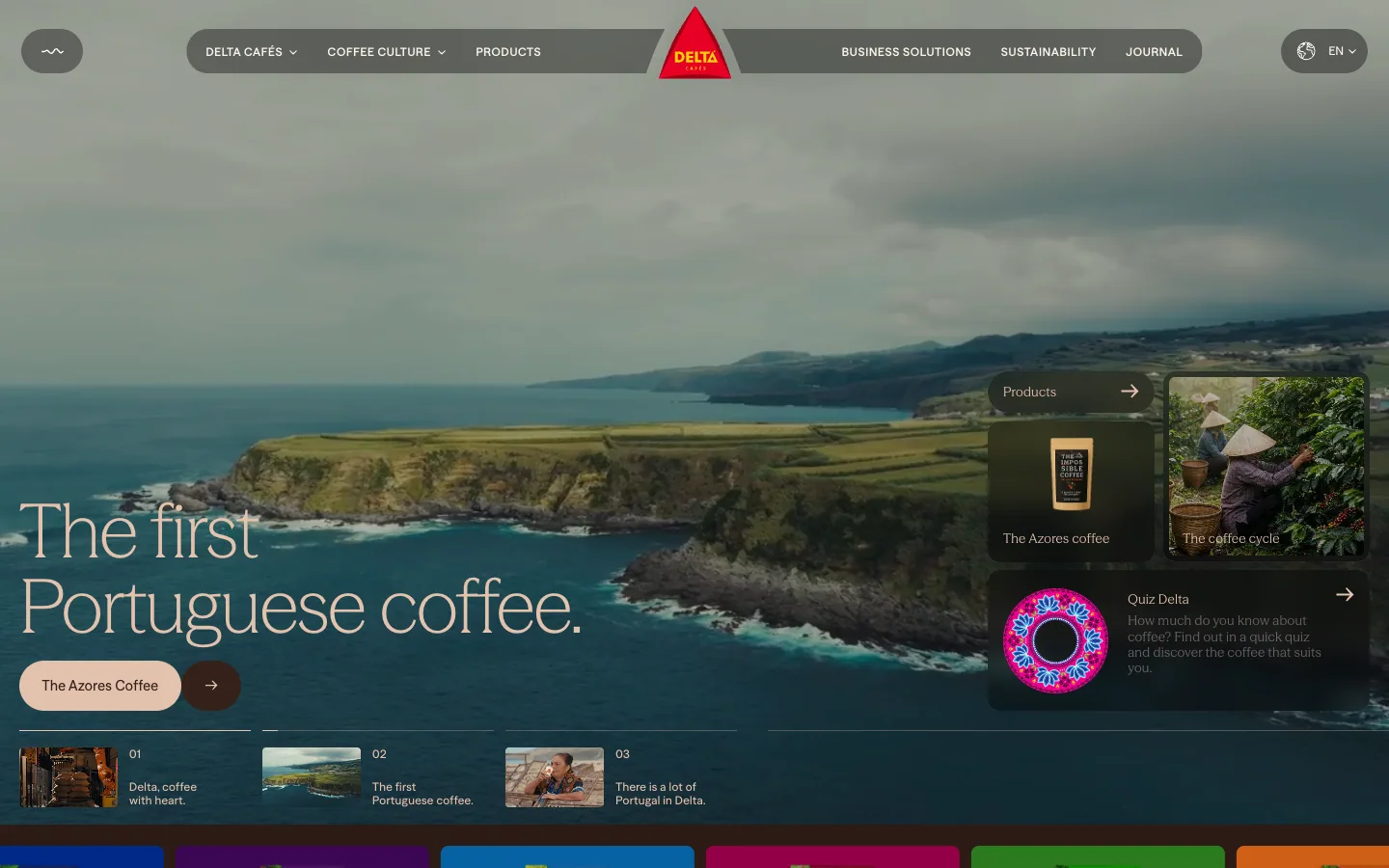
Delta Cafés alternates dark espresso-brown and cream grounds; Orior AI switches from a pale ground to black to separate promise from proof.
In the library: Delta Cafés, Orior AI
Horizontal scroll
The main content moves sideways, by scrolling or dragging, usually one row inside a vertical page.
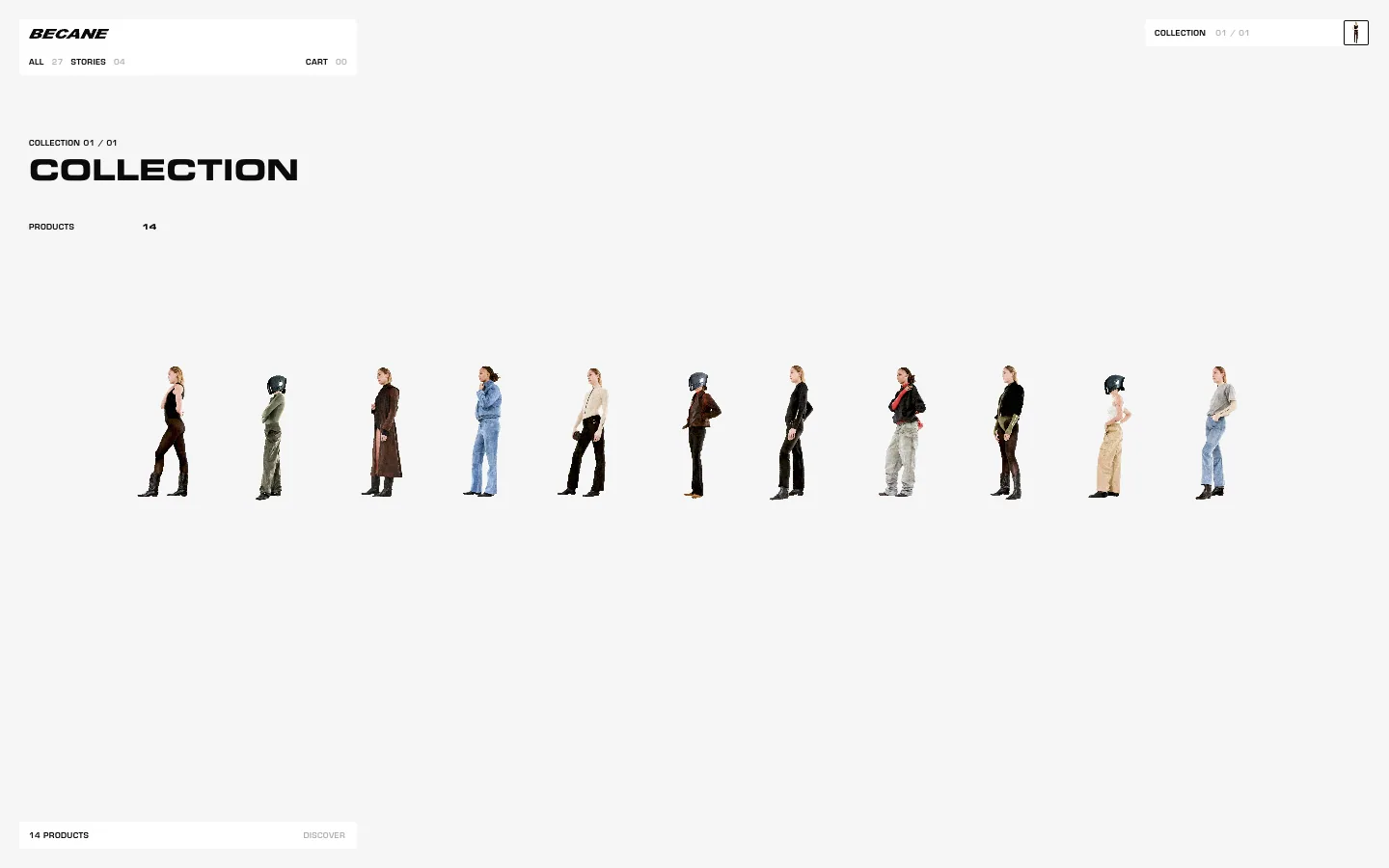
Bécane's whole shop is one sideways row of 14 cut-out figures.
In the library: Bécane, fallengrey, Pebble Flow
Parallax
Layers move at different speeds as you scroll, to add depth. Decoration, never behind text.
No published site in the library is tagged parallax yet.
How to plan one.
- Write it as a plain page first. Every frame of a pinned scene is real text or a real image, in reading order. The scroll effect enhances that page; it never creates content.
- Open with the point. Say what the page is in the first screen and put the main action there, then repeat it at the end. In NN/g's 2018 eye-tracking study, 57% of viewing time went to the first screen and 74% to the first two.
- Three to five frames per scene, each readable on its own.
- Chapters that differ. Give each chapter its own layout and repeat one device (a number, a line, the lead object in a new state) to tie them together. Five identical heading-and-paragraph blocks are not chapters.
- Pin only where there is room. A sticky figure in a single phone column covers the text it should sit beside; pin it from about 56em wide.
Build a pinned scene in CSS.
No JavaScript: position: sticky holds the figure, and scroll-driven animations (animation-timeline: view()) tie each effect to its place on the page. MDN lists view() as Baseline 2026, newly available, so it is missing in older browsers; everything that moves sits inside @supports, and the base styles are the finished page.
<section class="scene" aria-labelledby="scene-title">
  <h2 id="scene-title">How the water rose</h2>
  <figure>
    <svg viewBox="0 0 200 120" role="img" aria-labelledby="scene-title">
      <rect class="level" x="0" y="40" width="200" height="80" />
    </svg>
    <figcaption>The caption says, in numbers, what the motion shows.</figcaption>
  </figure>
  <ol class="steps">
    <li class="step"><p>First step of the story…</p></li>
    <li class="step"><p>Second step…</p></li>
    <li class="step"><p>Third step…</p></li>
  </ol>
</section>
/* Base: the finished page. Every step is real text, in order,
and every effect's end state is the default. */
body { background: #f4f8fa; color: #0b2233; } /* 15.23 : 1 */
.scene { display: grid; gap: 2rem; grid-template-columns: minmax(0, 1fr); }
.scene figure { margin: 0; }
.scene figcaption { color: #41586b; } /* on #f4f8fa: 6.94 : 1 */
.steps { display: grid; gap: 2.5rem; padding: 0; list-style: none; }
.step {
background: #fff; /* #0b2233 on it: 16.27 : 1 */
border-radius: 8px;
padding: 1.25rem 1.5rem;
}
.level {
fill: #1f7fa8; /* on #f4f8fa: 4.22 : 1, above 3 : 1 for graphics */
transform-box: fill-box; /* scale from its own bottom edge */
transform-origin: 50% 100%;
}
/* Pin the figure only where it fits beside the text. */
@media (min-width: 56em) {
.scene { grid-template-columns: minmax(0, 1fr) minmax(0, 1.1fr); }
.scene figure { position: sticky; top: 2rem; }
.steps { gap: 34vh; padding-bottom: 12vh; }
}
@keyframes rise { from { opacity: 0; transform: translateY(2rem); } to { opacity: 1; transform: none; } }
@keyframes fade { from { opacity: 0; } to { opacity: 1; } }
@keyframes tide { from { transform: scaleY(0.66); } to { transform: none; } }
/* Effects exist only where scroll-driven animation does. */
@supports (animation-timeline: view()) {
.step {
animation: rise linear both;
animation-timeline: view(); /* after the shorthand */
animation-range: entry 0% entry 55%;
}
@media (min-width: 56em) {
.scene { view-timeline: --scene block; }
.level {
animation: tide linear both;
animation-timeline: --scene; /* scrubbed by the whole scene */
animation-range: contain 0% contain 90%;
}
}
/* Reduced motion: no movement. Steps fade, the figure shows its end state. */
@media (prefers-reduced-motion: reduce) {
.step { animation: fade linear both; animation-timeline: view(); animation-range: entry 0% entry 55%; }
.level { animation: none; transform: none; }
}
}This is the pattern from our scroll-stories recipe, tested in Chrome with Playwright. With reduced motion on, the moving parts computed to transform: none while the fades still ran on the scroll timeline. The figure's shape scales from its own bottom edge (transform-box: fill-box) rather than sliding: a shape translated outside its SVG made the accessibility checker unable to read the caption's background, and scaling it fixed that with the animation kept.
For a sideways row, keep the browser's own scrolling and stack the row on phones:
/* A sideways row: native scrolling with snap, one column on phones. */
.row { overflow-x: auto; scroll-snap-type: x mandatory; overscroll-behavior-x: contain; }
.row > ul { display: flex; gap: 1rem; width: max-content; margin: 0; padding: 0; list-style: none; }
.row li { flex: 0 0 17rem; scroll-snap-align: start; }
@media (max-width: 40em) {
  .row { overflow: visible; scroll-snap-type: none; }
  .row > ul { width: auto; flex-direction: column; }
}
/* <div class="row" role="region" aria-label="The collection" tabindex="0">:
   a labelled, focusable region, so the arrow keys scroll it. */
Rules for every scroll story.
| Rule | Why |
|---|---|
| Native scrolling, never hijacked | Readers need scrolling to be fast, small and reversible; changing its speed or direction breaks that |
| The finished state is the default | Browsers without scroll timelines still get the whole story |
| Movement becomes a fade under reduced motion | WCAG 2.3.3 (AAA) names parallax scrolling as motion people should be able to turn off; a fade keeps what the motion showed |
| A caption states what the motion shows | Numbers and years in text reach everyone, whether or not the animation runs |
| Animate transform and opacity only | They change without layout or paint, so scrolling stays smooth |
| Text stays real text | Split letters and words are hard for screen readers; prefer masks and whole-line reveals |
| Sideways rows are reachable by keyboard | A labelled region with tabindex=0 scrolls with the arrow keys; cards out of view should not take focus |
Pitfalls.
- Content that only exists mid-animation. If a sentence appears only when a timeline reaches 60%, a reader who scrolls fast or has motion turned off never sees it.
- Starting states in the base style. opacity: 0 or scaleX(0) outside @supports leaves an element invisible forever in a browser without scroll timelines. Set starting states only inside the @supports block.
- The action buried at the end. A story can build, but the first screen must already say what this is and what to do.
- Length for its own sake. A pinned scene that takes thousands of pixels to play costs every reader that scroll. Copy the idea, not the length.
- The same effect everywhere. One fade-and-rise applied to every section, count-up numbers and a marquee strip read as a template, not a story.
Real examples in the library.
Delta Cafés
A Portuguese coffee brand's heritage site. A full-bleed Azores landscape under a light serif headline, a strip of coloured packs, a dark espresso-brown story section with archive photos orbiting a 1961 portrait, and a cream journal and quiz.
United Carriers
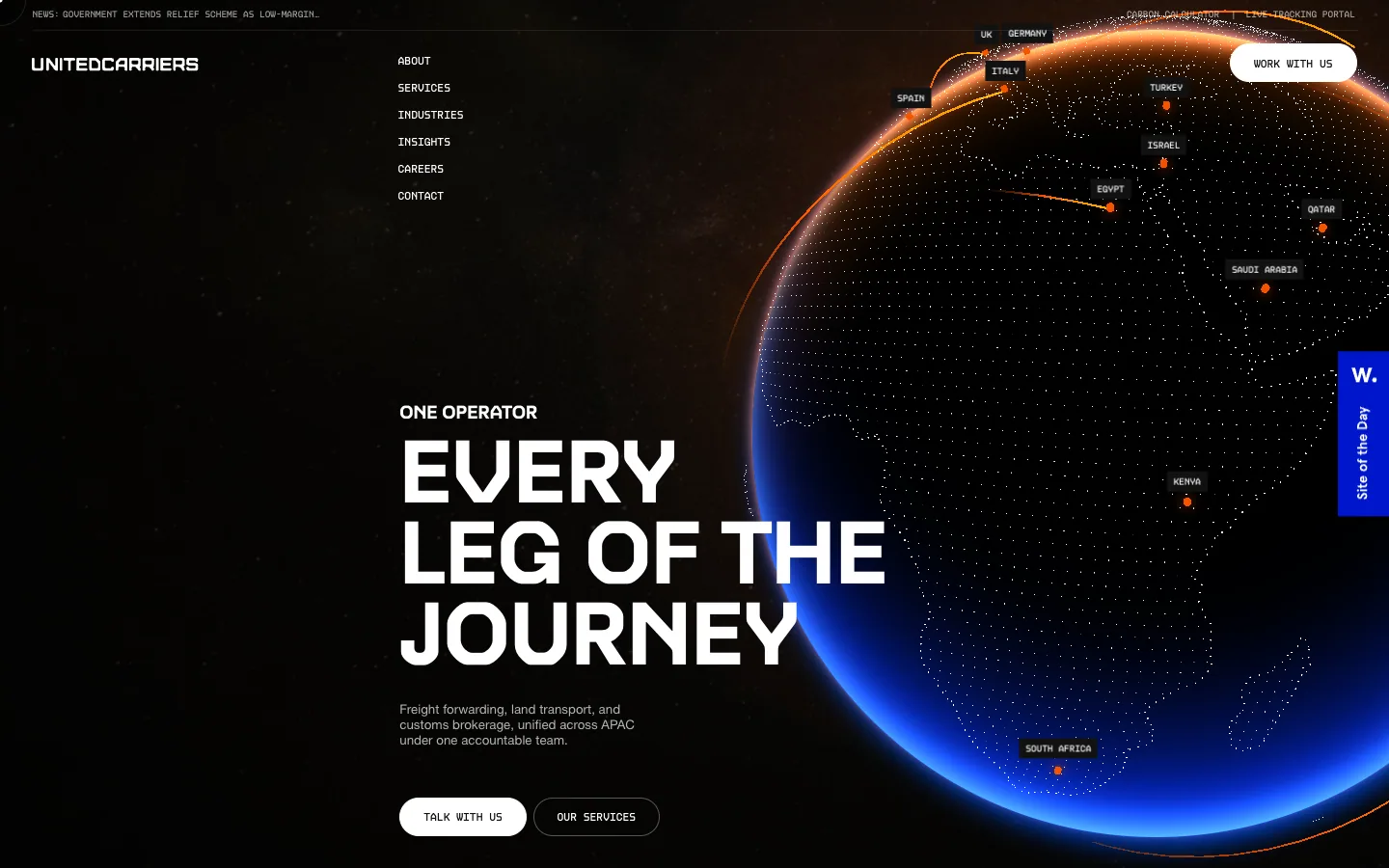
Freight forwarding across APAC, presented as a cinematic dark scene: a glowing WebGL globe, wide techno display caps and mono route labels, then calm white sections with big numbers.

Orior AI
Landing page for an AI tool that keeps one character's face consistent across photos and videos, then posts them to social platforms. A pale hero of large portrait photography with face-match callouts turns into a black section of before/after image pairs and a logo strip.

Heart Aerospace
A hybrid-electric regional aircraft company shown through one full-bleed sky photograph of the ES-36 under a 130px white grotesque headline, then a 490px 'ES-36' wordmark that scrolls over the plane, a top-down aircraft render, and investor logos on white.
fallengrey
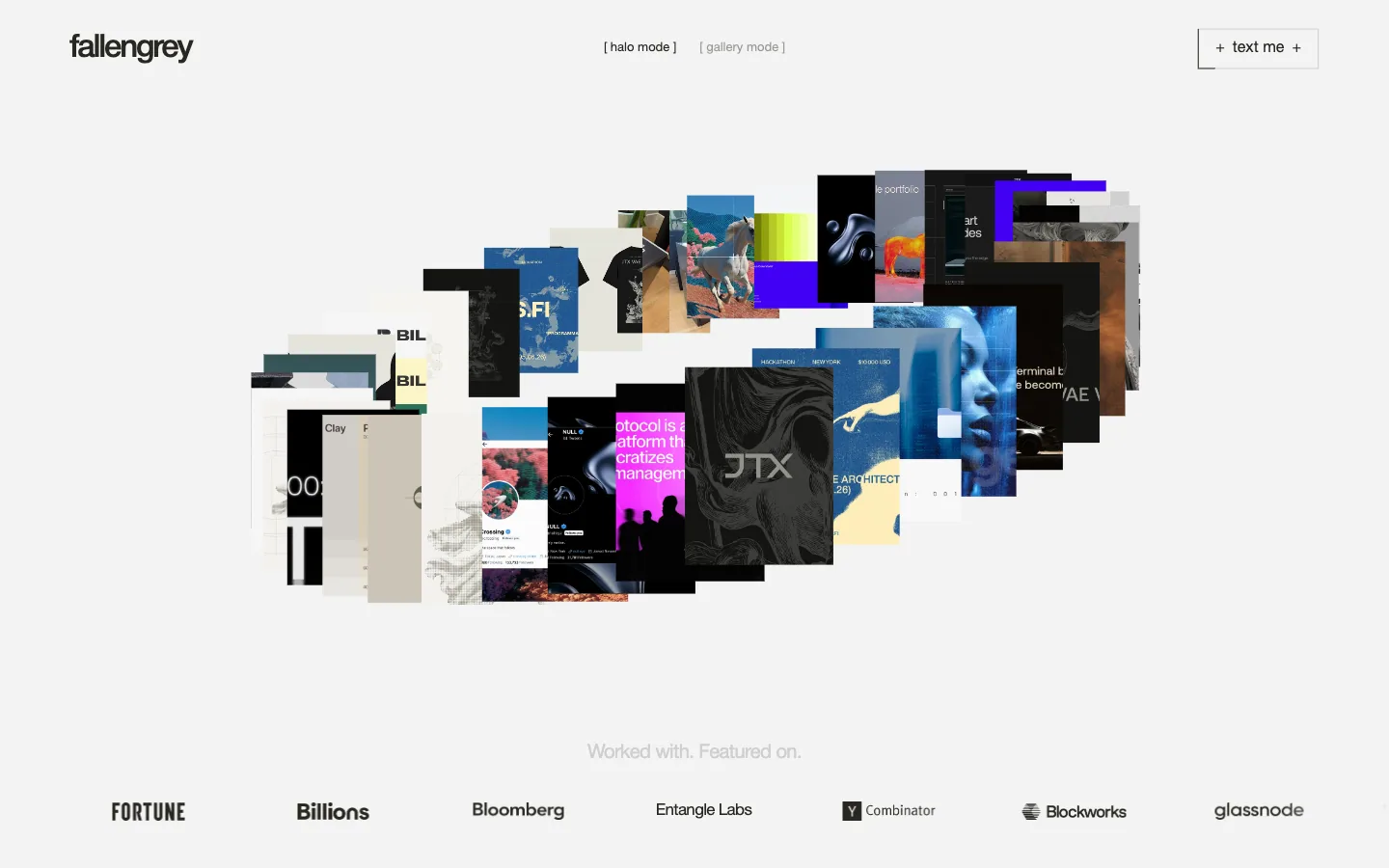
Portfolio and offer page for a one-person brand and web design studio. A ring of project thumbnails with a halo/gallery mode switch opens onto a client-logo strip, a short positioning statement, and three openly priced engagements in a sideways carousel.
Bécane
Shop for a Paris womenswear label. A pale grey page holds a single row of 14 cut-out figures that scrolls sideways, small floating label bars for navigation, and one oversized extended-caps brand statement as the footer.

Maxima Therapy
Therapy programmes for children and neurodivergent people. A butter-yellow page of flat red, blue and green illustrated characters, tilted service cards, a giant bouncing 'learn' and condensed caps statements.

Pebble Flow
An all-electric travel trailer. A warm sand page with a big rounded headline over lifestyle photos, carousels of features and use cases, a self-powered split section and a dark interior photo inviting a tour.
Questions.
What is scrollytelling?
Scrollytelling is telling a story by scrolling: text, pictures and graphics change as the reader moves down the page, instead of behind clicks. Its common forms are a pinned scene that plays while you scroll, chapters, a graphic that updates beside steps of text, and sideways rows. The New York Times' “Snow Fall” (2012) made it famous.
What was the first scrollytelling website?
The New York Times' “Snow Fall: The Avalanche at Tunnel Creek”, published on 20 December 2012, is the piece most often credited. Its paths down the mountain were drawn as the reader scrolled, and it drew more than 3.5 million page views in its first six days. Scroll-triggered effects existed before it; Snow Fall is the one that made the form famous.
How do you make scrollytelling in CSS?
Pin a figure with position: sticky beside steps of text, then drive animations from the scroll with animation-timeline: view() or a named view-timeline, inside @supports (animation-timeline: view()). Make the finished state the default, so browsers without scroll timelines show the whole story, and switch movement to fades under prefers-reduced-motion: reduce.
What is the difference between scrollytelling and parallax?
Scrollytelling is a way of telling a story: the content changes in order as you scroll. Parallax is one effect, layers moving at different speeds, that a scrollytelling page may or may not use.
Is scrollytelling accessible?
It can be, if all text is in the page in reading order whether or not the effect runs, scrolling stays native, keyboard users can reach everything, and motion stops or becomes a fade when the reader asks for reduced motion. WCAG 2.3.3 (Level AAA) names parallax scrolling as motion people should be able to turn off.
What is scroll hijacking?
Taking over the browser's scrolling: changing its speed, snapping the page between screens, or turning a downward scroll into something else. It breaks the reader's sense of where they are and is the most common way scrollytelling goes wrong.
Sources
- “How we made Snow Fall”, Source (OpenNews), 1 January 2013, interviews with the New York Times graphics team
- Wikipedia, “Snow Fall”, read 17 November 2026
- Bill Shander, “The Past, Present and Future of Scrollytelling”, Nightingale, 25 August 2020
- Mike Bostock, “How To Scroll”, 3 November 2014
- MDN Web Docs, view(), read 17 November 2026
- MDN Web Docs, prefers-reduced-motion
- W3C, Understanding WCAG 2.2 SC 2.3.3 Animation from Interactions
- Therese Fessenden, “Scrolling and Attention”, Nielsen Norman Group, 15 April 2018
- What a design! recipes “Scroll-driven stories, parallax and text effects” and “Drag interactions and horizontal scrolling”, tested in Chrome with Playwright in November 2026; contrast pairs computed with the WCAG 2 formula
- What a design! trend research, 5 November 2026: tags on the 31 latest Awwwards Sites of the Day, 6 October to 5 November 2026
- What a design! library snapshot of 17 November 2026